From LiDAR scan to client-ready delivery
Every feature in RoadScope exists because heavy-haul operations demanded it. Not generic SaaS retrofitted for transport โ purpose-built, end-to-end, from the first LiDAR scan to the last convoy mile.
New capabilities live across the platform
AI Report Studio (custom PDF / DOCX / HTML templates ยท revision chat ยท pre-publish quality gate) ยท Max Load AI assistant ยท Route Intelligence dimension filtering & map-area scans ยท normalized Height / Width export columns ยท drawing Eraser with one-click Undo ยท shared-map Envelope tab synced with load height ยท 14-day free trial ยท NAV Live Dispatch ยท Client Delivery Portal ยท Permit Auto-Fill ยท Route Comparison ยท Weather-on-the-Way.
Everything in one platform
Five integrated capability areas โ each purpose-built for a stage of the heavy-haul workflow.
Capture what matters in the field
From LiDAR-verified clearances to geo-tagged photos โ structured, professional field data collection purpose-built for heavy haul.
MeasurePRO LiDAR Integration
Connect field-grade LiDAR capture directly to your RoadScope projects. Verified clearance measurements with full provenance.
GPS-Tagged Photo Documentation
EXIF-extracted GPS coordinates, automatic compression, integrated with the POI system. Every photo is evidence.
Mobile Field App
Real-time GPS elevation profiling, offline capabilities, geo-tagged photo capture, and the full POI creation workflow on any device.
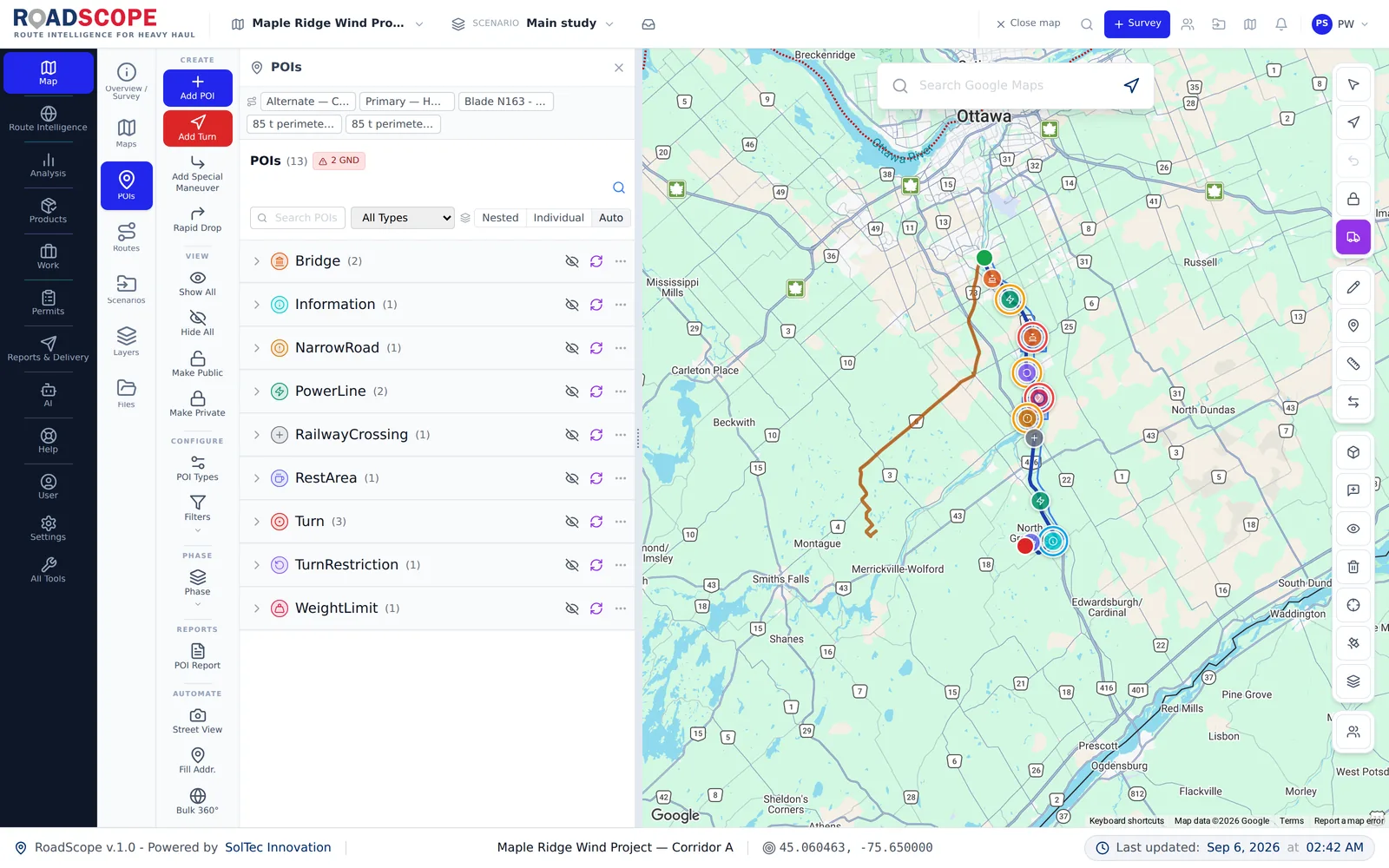
Professional POI System (35+ Types)
Bridges, culverts, overhead utilities, intersections, staging areas, escort transitions โ each POI is a structured data record, not just a pin.
Survey Scheduling & Team Assignment
Schedule field surveys, assign them to team members, and track completion status without leaving the platform.
Insta360 Field Capture Guide
In-app camera setup guide and field workflow checklist accessible directly from the Survey Import modal โ no more lost-in-translation 360ยฐ captures.
360ยฐ Street View Add-on
Capture, process, and navigate 360ยฐ street-level imagery along your route corridors. Inspect structures, clearances, and road conditions remotely without additional software.
MeasurePRO Pairing & Real-Time Sync
Generate a 7-day RS-XXXXXX pairing code so the field crew can link a MeasurePRO device to your survey and stream POIs back automatically.

POI details panel showing clearance data from field capture
Analyze what the route actually demands
OS/OW-specific analysis tools that expose the constraints generic mapping will never show you.
OS/OW-Specific Route Mapping
Vertical and horizontal clearance risks, tight geometry, sensitive zones, and rural road exposure โ built for permit strategy, not just navigation.
Elevation & Grade Analysis
GPS-based elevation profiles to identify steep grades, critical transitions, traction risks, and braking zones.
Route Comparison View
Compare two routes side-by-side across clearance constraints, grade profiles, POI counts, and permit complexity to make the defensible call.
AI Analytics Advisor
Intelligent analysis of your route data โ surfaces insights, flags anomalies, and helps you prepare permit documentation faster.
7 Map Providers
Google Maps, SolTecWorld, Esri ArcGIS, Mapbox, HERE Maps, TomTom, and SolTecQC โ switch contexts without losing your data.
International Route Intelligence
Expanded data coverage: SolTecCAN (Canada bridges), SolTecON (Ontario events), SolTecDE (Germany bridges), and SolTecDOT (US state events).
SolTecWorld Structure Analysis Add-on
Query and overlay structure data (bridges, culverts, tunnels, overpasses) directly on route maps for rapid pre-survey reconnaissance.
Weather-on-the-Way
Per-route, per-segment weather risk reports with operational risk banners (Good to Travel / Use Caution / High Weather Risk / Do Not Dispatch). Includes a quick AโB weather check for any candidate route.
Multi-Phase Workflow (Preplan โ Road Survey โ SharedMap)
Tag every POI and route by phase. The phase filter controls both sidebar and map at once, and bulk per-type phase switching keeps large surveys tidy.
Rail Crossings & Sidings
A comprehensive layer of indexed rail crossings and sidings across North America โ at-grade, grade-separated, and siding locations sourced from external route intelligence sources. Automatically overlaid on route maps so surveyors can identify crossings that require special permits, flaggers, or escort coordination.
Route Intelligence Dimension Filtering & Area Scans
Filter Route Intelligence findings by your load height and width โ every structure is classified as Match, Excluded, or Unknown, with normalized Height/Width columns in Excel exports and POI reports. Scan a drawn map area (not just a route), and your last-used filter is remembered across sessions.
Max Load AI Assistant
An app-driving AI assistant launched straight from the map tool palette. Ask it to analyze the maximum load envelope for a corridor and it works with your survey data โ every proposed action is reviewed before it runs.
Drawing Eraser with One-Click Undo
Click-to-erase drawn shapes, layer strokes, and labels directly on the map โ with a one-click Undo toast that restores anything deleted by mistake.
Unified Distance Units
A single Miles/KM preference now drives every distance display in the app. Short measurements show meters or feet automatically, with auto-promotion to km / miles for longer measurements.

Satellite route view with multi-route mapping and constraint overlays
Produce deliverables clients trust
From permit packages to interactive client maps โ professional outputs that represent the quality of your work.
Interactive HTML Report Suite
Nine self-contained interactive reports from the Reports Hub โ POI Photo Register, Envelope Clearance, Clearance Profile, Width, Rail, Province, Work Required, Survey Plan + Weather, and the multi-corridor Route Survey master report. Live load-dimension sliders recompute clearance verdicts instantly, and every report works offline and prints cleanly.
AI Report Studio
Draft survey reports with AI assistance โ upload your own PDF, DOCX, or HTML template and RoadScope maps its sections deterministically. Refine drafts through a post-generation revision chat, and a 7-check pre-publish quality gate audits every report (taxonomy, coverage, styling, verdicts) before it can go out.
Driver Briefing PDF
Purpose-built driver briefing documents with route maps, hazard summaries, and critical POI callouts โ ready to hand to the crew.
Engineering-Grade Maps
Professional maps for permit applications, client approvals, driver briefings, and compliance reviews โ designed to be shared, archived, and defended.
Client Delivery Portal
Share a live, branded interactive map directly with your client. No software required on their end โ just a link. The professional standard for route delivery.
Turn-by-Turn Directions
Street-by-street route name extraction with distances, exactly as permit authorities and driver briefings require.
Permit Route Lists
Routes organized by province/state jurisdiction โ formatted exactly as regulators require, ready to attach to your application.
Permit Auto-Fill
Pre-populate permit application fields from your route data โ jurisdiction, dimensions, constraint summaries, and route descriptions filled automatically.
OS/OW Document Center
Vehicle specs, certificates, and permit documents stored alongside the route record so the full compliance package travels with the project.
Word (.docx) Export & Custom Templates
Export reports to Word and customize templates so deliverables match your firm's house style.
Professional Export Formats
PDF reports, GeoPDF, KML/KMZ, GeoJSON, GPX โ every format your existing tools and regulators understand.

Reports Hub showing multiple report types and customization
Collaborate without the chaos
OS/OW projects are multi-stakeholder by nature. RoadScope supports that reality from day one.
Project-Based Collaboration
Share routes and surveys with team members, contractors, and stakeholders. Role-based access ensures the right people see the right things.
Survey Scheduling
Assign field surveys to team members, set due dates, and track progress across multiple concurrent projects.
Street View Integration
Google Street View for remote POI inspection, route verification, and site reconnaissance โ without additional field visits.
Version Control & Audit Trail
Every change logged, every version preserved. Defensible decisions require traceable evidence โ RoadScope provides both.
QGIS Integration
Bidirectional data exchange with desktop GIS for professional analysis workflows. Import 15+ formats including LandXML, Shapefile, GeoTIFF.
NAV Live Dispatch
See active SolTecNAV surveyors live on the office map and push a revised route directly to a specific surveyor. They Accept to switch instantly or Save for Later.
Live Support Screen Sharing
Invite a teammate or support agent to view your map session live for faster troubleshooting and walkthroughs.

Collaborators panel showing role-based access and team management
Connected from field to convoy
RoadScope is the hub of a complete hardware-to-delivery ecosystem. Every tool built to connect.
MeasurePRO LiDAR Hardware
HardwareField-grade LiDAR clearance capture that syncs directly to RoadScope. Verified measurements with provenance.
SolTecNAV Turn-by-Turn Convoy
IncludedExport routes to mobile for real-time turn-by-turn navigation, hazard alerts, and convoy coordination. Included in Operator and Enterprise plans.
OversizeHUB Permit Management
Coming SoonPermit application management connected to your RoadScope route records. The full compliance loop, closed.
Camera-Bridge Windows Service
Lightweight Windows service bridging GoPro, Ricoh Theta, and Insta360 cameras directly to your RoadScope field workflow.
SolTecUSA Bridge Inventory Add-on
Add-onOverlay bridge inventory data for all US states โ posted weight limits, deck conditions, vertical clearances, bridge authority contacts.
Field + Office Workflows
Bridges field surveys with office planning, permits, and decision-making. Complements AutoTURN, LiDAR, and engineering workflows.
What's New Changelog
Stay current with every platform update, new feature, and improvement via the in-app changelog โ no release notes buried in email.

Tools menu showing the full ecosystem of connected capabilities
See the complete experience
Real screenshots from the RoadScope platform

Route Management
Organize and manage multiple routes per project

Layer Management
Import and manage GIS layers with drag-and-drop

File Storage
Store vehicle specs, PDFs, and external links

Permit Requirements
AI-powered jurisdiction analysis and permit guidance

Data Import
AI Smart Import or manual file processing

Professional Export
GeoJSON, KML, GPX, GeoPDF, and more

Client Delivery Portal
Share live interactive maps with clients โ no software needed

Tools & AI Hub
AI Analytics Advisor, Street View, exports, and more

Documentation
Comprehensive guides and tutorials built in
Built for your industry
Specialized workflows for every role in OS/OW operations
Heavy Haul & OS/OW Transport
For transporters, carriers, and logistics teams moving oversize and overweight loads.
- Identify clearance and geometry risks early
- Route Comparison to pick the defensible option
- Driver Briefing PDFs ready for crews
- Client Delivery Portal for professional handoff
Wind Energy Logistics
For EPCs, developers, and logistics teams moving turbine components.
- Grade analysis for blades, nacelles, and tower sections
- Rural road constraint documentation
- Multi-jurisdiction permit package generation
- Client-ready interactive route delivery
Engineering & Consulting
For engineering firms providing route analysis and consulting services.
- Centralize route intelligence and structured POI records
- AI Analytics Advisor for faster analysis
- Professional cartography clients can trust
- Audit trails for regulatory accountability
Escort & Field Survey Teams
For pilot car operators and field surveyors capturing real-world data.
- Survey Scheduling and team assignment
- MeasurePRO LiDAR for verified clearances
- Real-time sync with office planners
- SolTecNAV for convoy coordination on the road
The complete platform for heavy haul operations
From the first LiDAR scan in the field to the client's interactive map delivery โ every step connected, documented, and defensible.